
Universities are increasingly taking a more strategic, enterprise-wide approach to corporate engagement by connecting research, talent, philanthropy, and innovation into coordinated partnerships.
Salesforce can serve as the foundation for this model, but success requires more than implementing a CRM. It requires a shared data model, clear workflows, and visibility across campus.
This blueprint outlines a practical architecture for managing many-to-many university–industry relationships at scale.
How to Navigate This Guide
This is a comprehensive blueprint. Jump to a section:
- What Corporate Engagement Means in Higher Education
- The campus-wide touchpoints map
- Suggested Salesforce architecture for corporate engagement
- Crucial Data Guardrails
- The corporate engagement dashboard pack
- Scaling Corporate Engagement on Salesforce
- Governance: How to keep it from becoming a mess
- FAQ: Corporate Engagement on Salesforce
- Ready to make corporate engagement easier (and measurable)
What corporate engagement means in higher education
Definition: Corporate engagement in higher education means taking a holistic, client-centered approach to managing university-industry partnerships.
It encompasses sponsored research, technology transfer, philanthropy, talent recruitment, executive education, and event sponsorships.
It is not simply transactional fundraising or a single department’s employer relations; it is a coordinated, campus-wide strategy to maximize the full, 360-degree value of a corporate relationship.
Why Universities Struggle
As universities expand corporate partnerships, they often encounter operational complexity across decentralized campuses. Engagement with industry may span multiple colleges, research units, advancement, and career services, each with different processes and systems.
Without shared visibility, it becomes difficult to understand the full scope of a corporate relationship, let alone maximize that relationship. A company may recruit students, collaborate on research, and sponsor events, yet these activities remain tracked separately rather than as part of a coordinated partnership.
Common Failure Mode
A common pattern is managing relationships primarily at the individual level rather than the institutional level. When relationships are tied to a single contact or office, visibility is limited and coordination across campus becomes difficult.
Without a centralized architecture, university-to-corporate relationships are treated as individual connections. If a relationship manager moves to a new role, the university’s tie to that corporation is often lost entirely. Furthermore, without visibility, corporate partners are routinely inundated with competing, uncoordinated “asks” from different colleges within the same week.
What Good Looks Like
A unified, 360-degree view built on Salesforce Education Cloud allows leadership to understand the full corporate relationship in one place. A Corporate Partner dashboard can surface philanthropic activity, recruiting engagement, research collaboration, and sponsorships together.
This model also supports tracking both monetary opportunities (such as sponsored research) and non-monetary engagement (such as advisory boards or career events) within the same ecosystem, providing a complete view of partnership health.
The campus-wide touchpoints map
To improve coordination across campus, universities benefit from a simple but powerful framework: One company, many campus relationships.
In a traditional setup, corporate relationships are often managed 1-to-1, meaning one individual at the university owns the relationship with one individual at a corporation. If either person leaves, the partnership often dissolves. By shifting to a many-to-many model, institutions can map and coordinate every potential interaction a corporate partner has across the university.
Here is a breakdown of the core corporate touchpoints and their typical campus owners:
- Research Collaborations & Sponsored Projects: Owned by the Research Institute or specific academic colleges (e.g., College of Engineering).
- Technology Transfer & Licensing: Owned by the Tech Transfer or Innovation Office.
- Talent, Recruiting & Experiential Learning: Owned by the Office of Career Services or individual college career centers (often tracked in external systems like Handshake).
- Corporate Partnerships & Sponsorships: Owned by the Office of Business Engagement or Athletics.
- Continuing & Executive Education: Owned by Professional Studies or Extension programs.
- Philanthropy & Corporate Foundations: Owned by University Advancement or the Foundation.
Common Failure Mode
Uncoordinated outreach. When these touchpoint owners operate in a vacuum, a corporate partner might be solicited for a philanthropic gift by University Advancement on a Tuesday, and then asked to sponsor a research lab by the College of Engineering on a Thursday. This lack of alignment makes the university look disorganized and frustrates the partner.
What Good Looks Like
Centralized visibility with decentralized execution. Success looks like Georgia Southern University’s approach: integrating career-related data from Handshake directly into Salesforce so that hiring activity can be viewed in the exact same context as sponsored research, philanthropy, and innovation. Anyone on campus can see the full web of connections before making an “ask.”
Suggested Salesforce architecture for corporate engagement
You don’t need an overly complex architecture, but you do need a pragmatic, enterprise-ready model that supports many-to-many relationships across campus. Trying to force complex B2B relationships into a system designed strictly for student lifecycle management will inevitably create a mess.
Here is the recommended architectural baseline:
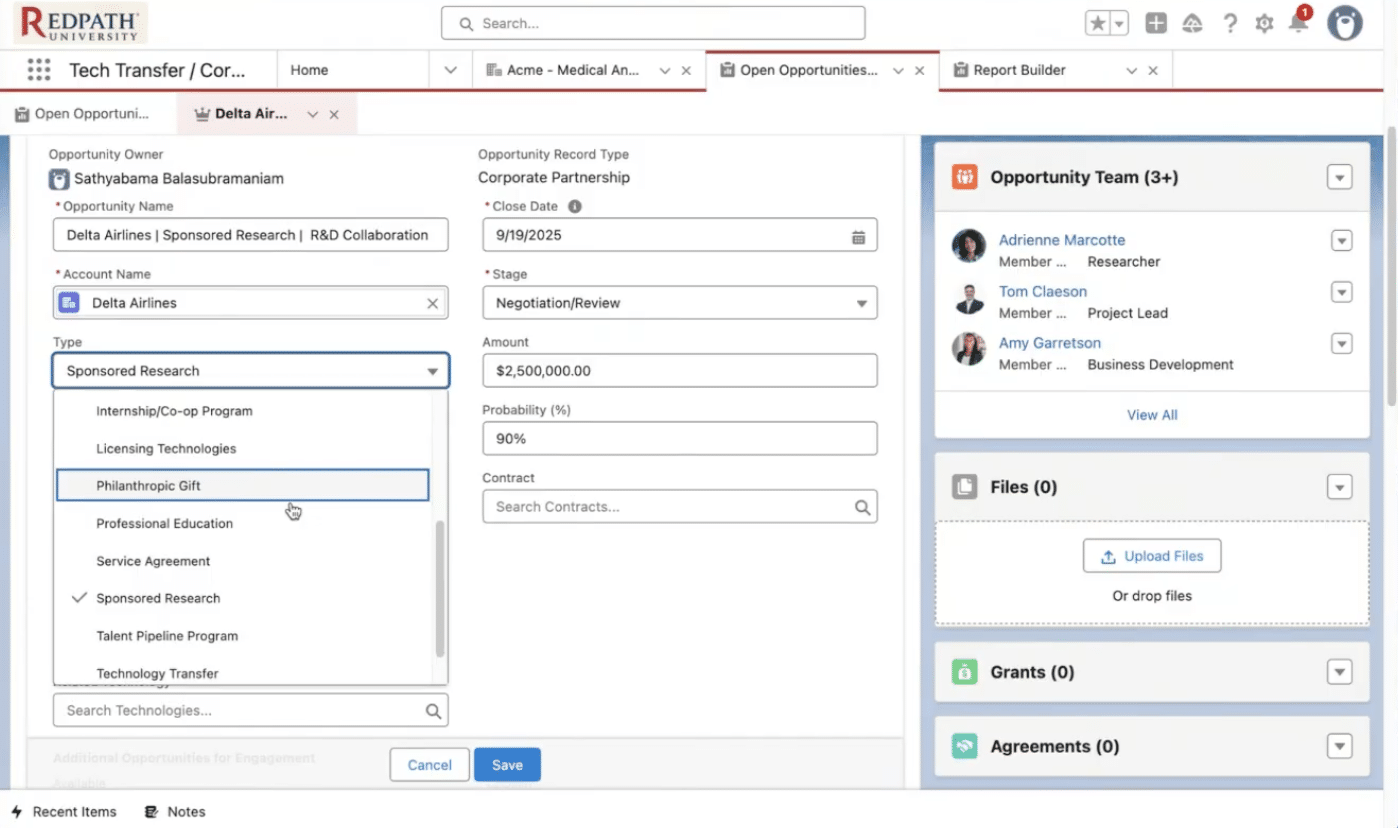
- The Core Spine (Standard Objects): Your foundation should rely on Accounts (the companies), Contacts or Persons Accounts (the people who work there), Activities (meetings, calls, logged emails), and Campaigns (events like career fairs or executive summits).
- The Engagement Layer (Custom Object vs. Opportunities): Universities take different approaches to tracking corporate engagement activity. Many institutions use Opportunities to track both monetary and non-monetary initiatives, which can simplify reporting and provide a unified pipeline view. In some cases, organizations may introduce a custom Engagement or Project object to track operational activity that does not represent a defined partnership opportunity. The right approach depends on how the university defines engagement value, measures outcomes, and manages relationship workflows. The key is maintaining a consistent model that supports both visibility and reporting across engagement types.
- Education Cloud Foundation: Building on the Education Cloud data model allows corporate relationships to connect to the broader academic ecosystem, including alumni, student internships, graduate research engagement, and workforce outcomes. While corporate engagement can be implemented on Sales Cloud, Education Cloud provides flexibility to expand into these higher education use cases over time.
Common Failure Mode
Ignoring Account Hierarchies. If a relationship manager creates an Account for “Nike,” another creates “Nike Australia,” and a third creates “Nike Research Division” without linking them, reporting becomes impossible.
What Good Looks Like
Enforcing strict Account Hierarchy rules. A clean architecture links regional offices and subsidiaries to a Global Parent Account. This means leadership can pull a single dashboard and see the aggregate financial and engagement impact of a massive, multi-national corporation across the entire university system.
Crucial Data Guardrails
What Good Looks Like
Strict Hierarchy Rules to prevent massive reporting gaps, require a Parent Account strategy for any company with multiple entities (e.g., Global Parent → Region → Subsidiary/Site). Establish a clear rule of thumb for when users should create a net-new account versus when they should attach a new engagement to an existing subsidiary. Standardizing naming conventions (e.g., “Company – Division – Location”) reduces the likelihood of disparate “Nike” vs “Nike Australia” accounts drifting apart in the system.
Common Failure Mode
Duplicate accounts reduce visibility and make reporting unreliable. Rather than relying on manual processes, institutions should leverage Salesforce’s native duplicate management features to prevent and identify duplicates.
Use strict matching rules to block the creation of obvious duplicates, and more flexible matching logic to alert users or report on potential matches. Combined with periodic data stewardship review, this approach maintains data integrity without slowing relationship management activity.
Common Failure Mode
Ignoring Account Hierarchies. If a relationship manager creates an Account for “Nike,” another creates “Nike Australia,” and a third creates “Nike Research Division” without linking them, reporting becomes impossible.
What Good Looks Like
Enforcing strict Account Hierarchy rules. A clean architecture links regional offices and subsidiaries to a Global Parent Account. This means leadership can pull a single dashboard and see the aggregate financial and engagement impact of a massive, multi-national corporation across the entire university system.
8 core corporate engagement workflows
Implementation is most successful when workflows are clearly defined. Below are the core processes needed to manage corporate engagement at scale.
- Intake
- Trigger: A corporate partner expresses interest (via website Experience Cloud form, direct email, or at an event).
- Steps: The system automatically parses the request and checks basic data against existing records to identify potential matches.
- Owner: Corporate Relations Triage / Central Coordinator.
- Salesforce objects touched: Lead (if used) or Account / Contact.
- Output: A qualified request ready for routing.
- Routing & Assignment
- Trigger: Qualified intake request is ready for processing.
- Steps: Based on the requested engagement type (e.g., research vs. talent), automated rules or triage staff route the request to the appropriate campus unit owner.
- Owner: System automation / Central Coordinator.
- Salesforce objects touched: Lead, Contact/Account, Opportunity
- Output: The correct relationship manager is notified and assumes ownership.
- Account/Relationship Creation + De-Dupe
- Trigger: A new company or contact needs to be logged.
- Steps: Relationship manager executes the “Search before create” protocol. If a match is found, they attach their new activity/engagement. If not, they create a new Account, linking it to the proper Parent Account in the hierarchy.
- Owner: Relationship Manager.
- Salesforce objects touched: Account, Contact, Account Contact Relationship.
- Output: A clean, standardized Account record with zero duplication.
- Handoff Between Units
- Trigger: An engagement in one unit uncovers an opportunity for another (e.g., a philanthropic donor wants to host an MBA Capstone projectr.
- Steps: The original owner logs a new Engagement or Task, tags the cross-campus counterpart, and provides summary context in the activity timeline.
- Owner: Originating Relationship Manager → Receiving Relationship Manager.
- Salesforce objects touched: Task, Activity, Engagement, Chatter (internal collaboration).
- Output: Shared ownership and seamless external partner experience without institutional silos.
- Pipeline & Stage Management
- Trigger: An engagement matures into a formal financial ask (e.g., a $500k sponsored research contract).
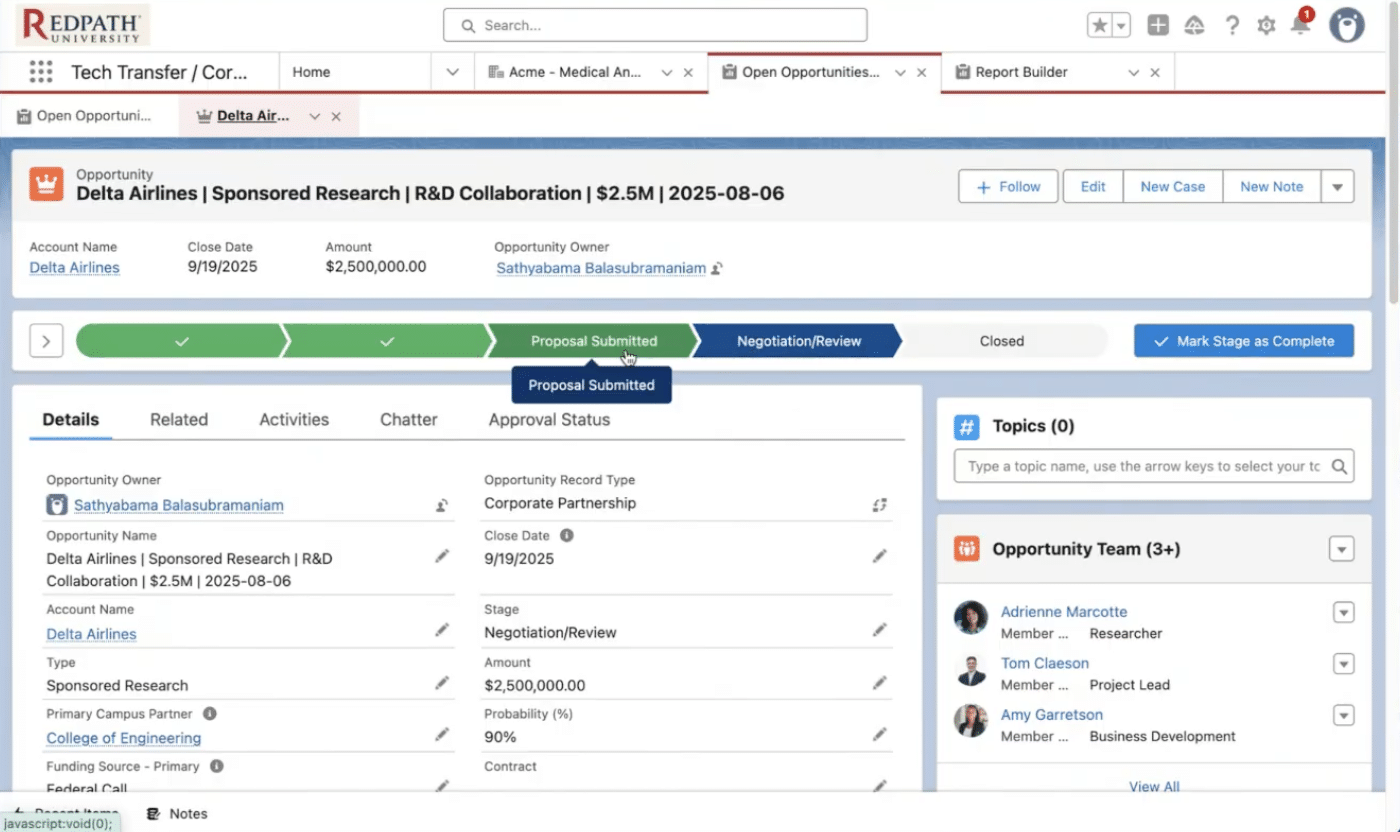
- Steps: Manager opens an Opportunity, establishes the Amount, probability stage (e.g., Identification, Discovery, Proposal), and links primary decision-makers via Contact Roles.
- Owner: Gift Officer / Tech Transfer Director / Corporate Partnerships Lead.
- Salesforce objects touched: Opportunity, Contact Roles, Activity.
- Output: Accurate revenue forecasting and pipeline visibility.
- Outcomes Capture
- Trigger: An engagement or opportunity reaches its conclusion.
- Steps: Manager logs the measurable result—whether that is finalized contract execution, philanthropic dollars received, or a definitive count of students hired.
- Owner: Relationship Manager / Operations.
- Salesforce objects touched: Opportunity (Closed Won), Engagement (Completed).
- Output: Provable, trackable ROI tied directly back to the corporate Account.
- Reporting & Quarterly Review Cadence
- Trigger: End of month/quarter.
- Steps: Leadership reviews automated dashboards to assess pipeline health, unit performance, and institutional coverage across strategic accounts. Missing outcome data is flagged for cleanup.
- Owner: VP Corporate Engagement / Operations Lead.
- Salesforce objects touched: Reports, Dashboards.
Output: Data-backed strategic decisions and leadership alignment.
The corporate engagement dashboard pack
Building the architecture is only half the battle; the real value of Salesforce lies in the visibility it provides to university leadership. A properly structured system allows you to build powerful dashboards that track KPIs, surface trends, and monitor your entire engagement pipeline.
Here are the 8 critical dashboards every enterprise-ready university needs, along with a metric dictionary to ensure everyone is speaking the same language.
The 8 Essential Dashboards
- Executive Overview: A high-level roll-up of total relationship health, active pipeline, and measurable outcomes across the university.
- Strategic Accounts Health: Are you actively engaging your top 50 corporate partners holistically, or are they only connected to one department?
- Engagement Pipeline by Type & Unit: A view of all non-monetary and monetary engagements (e.g., career fair participants, site visits, executive-in-residence) segmented by campus unit or channel.
- Activity & Coverage: Which high-value accounts lack a logged activity in the last 30 days? This ensures relationships don’t go cold.
- Sponsorship & Partnership Revenue Attribution: Tracking closed-won opportunities and financial outcomes tied to specific corporate relationships.
- Talent Outcomes: Integrating data from external systems like Handshake to visualize job postings, event attendance, and student internship placements directly alongside corporate accounts.
- Tech Transfer & Innovation Touchpoints: Visibility into licensing agreements, startup support, and sponsored research pipeline.
- Data Quality & Adoption: An operational dashboard flagging missing required fields, orphaned records, and potential duplicate accounts to keep the system clean.
Metric Dictionary (Standardizing the Language):
- Meaningful Touch: An activity (meeting, strategic call, campus visit) that advances a relationship. Mass emails do not count.
- Active Pipeline: Opportunities with a defined financial value or specific, measurable engagement goal that have moved past the initial identification stage.
- Converted Outcome: A finalized, measurable result (a signed sponsored research contract, a finalized philanthropic gift, or a completed hiring cycle).
Common Failure Mode
Vanity Metrics. Measuring the number of contacts in the database or the number of logged emails instead of active engagements and converted outcomes. If a dashboard doesn’t help leadership make a decision or predict revenue/impact, it is noise.
What Good Looks Like
Segmented Dashboards. Success is having clear visualizations that distinctly separate monetary deals from non-monetary engagements. When a Dean or VP logs in, they should instantly see what was closed this fiscal year versus what non-revenue projects are actively shaping the student experience.
Scaling Corporate Engagement on Salesforce
Once a foundational corporate engagement model is in place, Salesforce provides additional capabilities to extend and scale how universities interact with industry partners.
External Engagement & Intake (Experience Cloud) Institutions can introduce external-facing portals or structured intake forms to manage inbound corporate requests. This creates a more consistent entry point for engagement while improving routing, visibility, and partner experience.
AI-Assisted Relationship Management (Agentforce) AI can support relationship managers by surfacing insights and prompting action. This may include identifying high-value accounts with limited recent activity, highlighting stalled opportunities, or recommending follow-up actions based on engagement patterns.
These capabilities are most effective when built on a strong underlying data model and workflow foundation, enabling institutions to scale engagement in a structured and sustainable way.
Governance: How to keep it from becoming a mess
Governance ensures the system remains consistent, scalable, and trusted across campus. To prevent chaos, institutions must implement a “no drama, no surprises” governance playbook.
- Ownership Model Patterns: Decide early if you are using a centralized triage model (where a central Business Engagement office routes all inquiries) or a distributed model (where designated unit owners manage their own pipelines but share visibility).
- Data Stewardship Roles: Assign a dedicated data steward responsible for weekly deduplication, merging records, and maintaining the Account Hierarchy rules.
- Rules That Prevent Chaos: Enforce strict guardrails, such as making specific fields required before an Opportunity can move to the next stage. Use standardized picklists for engagement types rather than open-text fields to ensure clean reporting.
- Monthly Release Cadence: Establish a regular rhythm for rolling out system enhancements. Never let end-users make structural changes on the fly.
The implementation path (what it looks like in the real world)
A successful Salesforce implementation requires a pragmatic rollout strategy. Moving an entire decentralized campus onto a new system overnight is a recipe for user resistance and failure.
We recommend one of three paths:
- Pilot-First: Start with 1–2 highly collaborative units (e.g., the College of Engineering and the Innovation Office). Map their processes, prove the ROI, and use their success to build appetite across the rest of the campus.
- Hub-and-Spoke (Recommended): Establish a central hub, such as the Office of Business Engagement, and connect it with key early-adopter “spokes.” For example, Georgia Southern University successfully launched a shared platform unifying their Office of Business Engagement with their Office of Career and Professional Development (integrating Handshake data) before scaling outward.
- Campus-Wide Standard: Rolling out to the entire university simultaneously. While this is the ultimate goal, it is rarely recommended as a starting point due to the massive political and operational challenges of aligning dozens of departments at once.
FAQ: Corporate Engagement on Salesforce
What is a corporate engagement CRM? In higher education, a corporate engagement CRM is a centralized system (like Salesforce Education Cloud) used to track the total, 360-degree relationship between a university and its industry partners, encompassing research, philanthropy, talent recruitment, and sponsorships.
Do we use Opportunities or a custom Engagement object? Universities take different approaches to tracking corporate engagement activity. Many use Opportunities to capture both monetary and non-monetary initiatives, creating a unified pipeline and simplifying reporting. Others introduce a custom Engagement or Project object to track operational activity that does not represent a defined partnership opportunity.
The right approach depends on how the institution measures partnership value, structures engagement workflows, and defines reporting needs. Working with a partner to align the data model to these factors ensures the system supports both visibility and long-term scalability.
How do you handle many-to-many relationships? By using a combination of Account Hierarchies, Contact Roles, and custom Relationship. This maps exactly who on campus knows who at a corporation, across multiple departments.
How do you avoid duplicates across colleges? Leverage Salesforce’s native duplicate management features to block obvious duplicates, alert users to potential matches, and report on possible conflicts. This should be paired with clear Parent/Subsidiary Account hierarchy rules and periodic data stewardship review to resolve edge cases and maintain data integrity.
What’s the minimum viable dataset? At a minimum, you need standard Accounts (the companies), Contacts (the people), Activities (the touch history), and a way to track pipeline and engagement through opportunities and/or a custom object.
How do you handle ownership conflicts? Shift the culture from “owning the contact” to “owning the engagement.” Salesforce allows multiple relationship managers to own different active Engagements or Opportunities linked to the exact same corporate Account with features like Account Teams and Opportunity Teams.
What dashboards matter most to leadership? Leadership needs to see the Executive Overview (total pipeline and relationship health), Strategic Accounts Health (are we penetrating top-tier partners?), and Outcomes Capture (measurable ROI like funding secured or students hired). However, reporting in Salesforce is dynamic, flexible, and user friendly. This means the reporting is customized to the objectives and goals of each University, College, or Department. IT, Institutional Research, and Developers not required.
What should we integrate first? Focus on integrating systems that provide immediate visibility into high-value touchpoints. Integrating career services platforms (like Handshake) or advancement platforms provide a massive, immediate lift in cross-campus visibility.
Ready to make corporate engagement easier (and measurable)?
When corporate engagement is managed through a shared model, universities gain visibility into partnerships, coordinate outreach, and measure impact across research, talent, and innovation initiatives.
If you’re exploring how this blueprint could apply to your campus, we can help map a practical path forward.
Talk to an Architect for 30 minutes. We’ll sanity-check your current setup, your operating model, and the fastest path to a corporate engagement system that works.
No hype. No drama. Just a clear plan, built for higher ed reality.